Featured Post

Welcome to the Forensic Multimedia Analysis blog (formerly the Forensic Photoshop blog). With the latest developments in the analysis of m...

Showing posts with label Photoshop CS4 Extended. Show all posts

Friday, December 12, 2008

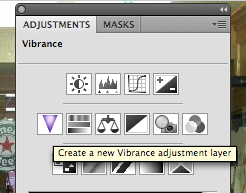
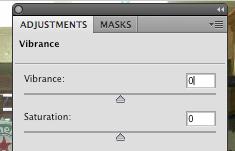
The New Vibrance Adjustment

New ... sort of. Vibrance adjustments have been a part of ACR and Lightroom for a while now. It was only a matter of time before it showed its head in Photoshop.

You'll find it in the second row of the Adjustments panel. Vibrance adds colour saturation into the colours that need it whilst leaving other colours alone. Photographers love the fact that Vibrance tends to leave skin tones untouched during adjustments.


Try Vibrance as an alternative to Hue/Saturation. You'll find that just a touch will often make the difference in your images.


Friday, November 21, 2008

What is Adobe Drive CS4?

I got a short e-mail from a reader that asked a simple question, "what is Adobe Drive CS4?" My guess is that she saw it on the install list for Photoshop CS4 Extended and wasn't too sure what to do with it.

In a general sense, Adobe Drive helps you to connect to Version Cue servers. Version Cue helps larger workgroups manage working on files, sharing assets, and much more. With Adobe Drive, the mounted drive looks and acts like any other mounted hard drive.

I don't know of too many law enforcement agencies that use Version Cue. Most people doing forensic analysis of images and video are working on stand-alone systems. For this type of user, Version Cue really doesn't have a part to play. For large labs or photography departments, Version Cue can be a life saver. Adobe Drive just makes it easier to work with Version Cue servers.


Click here to see what Adobe has to say about the subject.